
You open Google Ads for the first time and the setup screen asks for a goal, a campaign type, a bidding strategy and a daily budget. Google offers to recommend all four. Nothing on the screen tells you what a lead will cost, or whether your website can turn a click into an inquiry. We run Google Ads as a B2B digital marketing agency in India, and this Google Ads for beginners guide covers what we settle before any money is spent.
In Google Ads for beginners, setup, bidding and budget are three separate decisions, and each has a sensible default. We walk through all three, then end with a test for when Google Ads is not the right move yet. Paid search is one of the types of digital marketing, and the fastest way to test whether people want what you sell.
| The short answerStart with one Search campaign, set up conversion tracking before you spend, and send every ad to a page built around one offer. Use a simple bidding strategy while you collect data, then move to conversion-based bidding. Set a daily budget you can afford to lose while you learn, and judge results by cost per lead, not clicks. |
Table of Contents
What is Google Ads and how does it work?
Google Ads is Google’s advertising platform. You pick a campaign type, keywords, ad text and a budget, and Google runs an auction each time someone searches. Your Ad Rank, built from your bid, ad quality and the search context, decides whether your ad shows and in what position. On Search campaigns, you pay when someone clicks.
The auction runs for every search, so results shift by the minute. Google says Ad Rank combines your bid, the quality of your ad and landing page, minimum quality thresholds, how competitive the auction is, the person’s search context and the expected effect of extras such as sitelinks. The highest bidder does not always win. Google notes that higher quality ads typically lead to lower costs.
You will also see Quality Score, a 1 to 10 rating for each keyword. Treat it as a diagnostic, not a goal: Google states it is not an input in the auction. Its three parts, expected click-through rate, ad relevance and landing page experience, show which of the three to fix first.
Which Google Ads campaign type should a beginner use?
The campaign type decides where your ads can appear. For a first campaign, the choice is simpler than the menu suggests.
| Campaign type | Where ads appear | Beginner verdict |
|---|---|---|
| Search | Google search results | Start here |
| Performance Max | Across Google channels from one campaign | Later, once tracking is solid |
| Demand Gen | Visual ads on YouTube, Discover and Gmail | Later, to create demand |
| Display and Video | Websites, apps and YouTube | Later, for remarketing and awareness |
| Shopping | Product listings (needs a product feed) | Only for online stores |
Why Search first? People using Search are already looking for something, so you pay to meet demand that exists instead of creating it. Automated types such as Performance Max need clean conversion data, and a new account has none. This is our working guidance, not a Google rule.
How to set up a Google Ads Search campaign, step by step
Do these in order. Skipping step 2 is the costliest shortcut.
- Pick one goal. Choose one result, such as form inquiries or phone calls, and write down what a lead is worth to you.
- Set up conversion tracking first. Add the Google tag, or use Google Tag Manager, and record the action you want, such as a submitted form. You can also import key events from Google Analytics 4. Without this, conversion-based bidding has nothing to learn from. On our own Budget Planner, every lead is saved with its campaign source and Google click ID, so each inquiry traces back to an ad.
- Build a simple structure. An account holds campaigns, a campaign holds ad groups, and each ad group holds a tight set of keywords and ads that point to one page. One service per ad group keeps ads relevant.
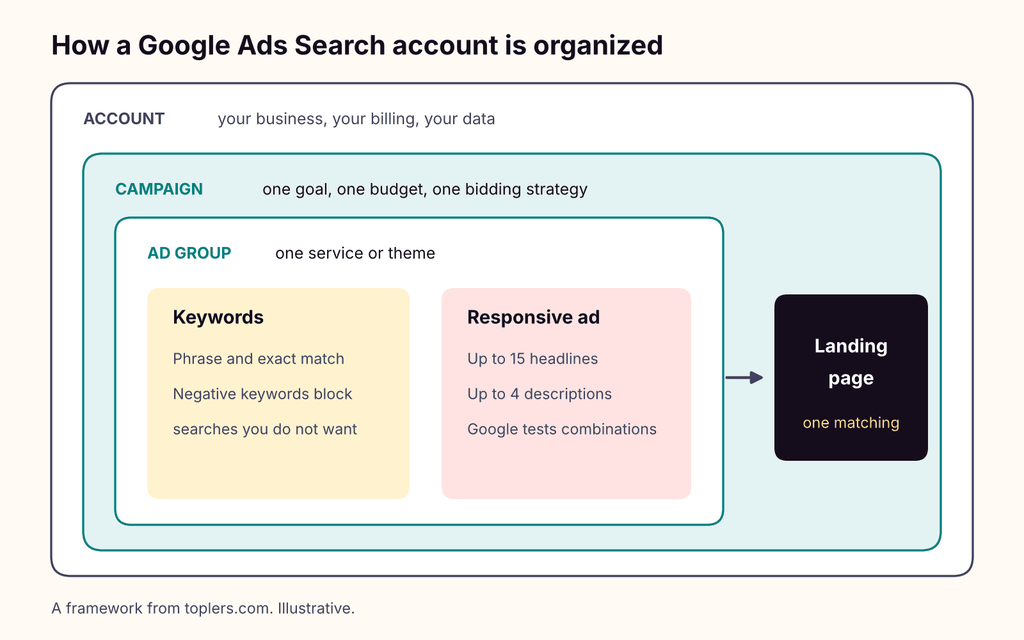
- Choose keywords and match types. Broad match reaches related searches, phrase match reaches searches that include your keyword’s meaning, and exact match reaches searches with the same meaning or intent. Broad match works best with conversion data behind it, so with none, we start with phrase and exact. Add negative keywords such as “free”, “jobs” or “course” to block searches you do not want.
- Write a responsive search ad. Add at least 3 headlines (up to 15, at 30 characters each) and 2 descriptions (up to 4, at 90 characters each). Google tests the combinations. Make each headline say something different: the service, the benefit, the proof, the next step.
- Match the landing page to the ad. Send each ad group to a page about that one service, with a clear form or call button that loads fast on mobile. Landing page experience is one of the three Quality Score parts.
- Set location, language and budget. Target the places you can serve and the languages your buyers search in.
How does Google Ads bidding work?
Bidding tells Google what a click, or a result, is worth to you. Smart Bidding is the group of automated strategies that use Google AI to optimize for conversions or conversion value in every auction. Target CPA, Target ROAS, Maximize conversions and Maximize conversion value all belong to it.
| Strategy | What it aims for | Data needed | Beginner use |
|---|---|---|---|
| Manual CPC | You set the maximum bid yourself | None | Tight control early on |
| Maximize clicks | As many clicks as the budget allows | None | Early data, with a CPC cap |
| Maximize conversions | As many conversions as the budget allows | Working tracking | The usual next step for leads |
| Target CPA | Conversions at an average cost you set | Steady conversion history | Once cost per lead settles |
| Target ROAS | Revenue at a return you set | Conversion values | Online stores |
Target CPA is an option you set on Maximize conversions. Here is the ladder we suggest. Clicks are not leads, so do not stay on step 1 for long.
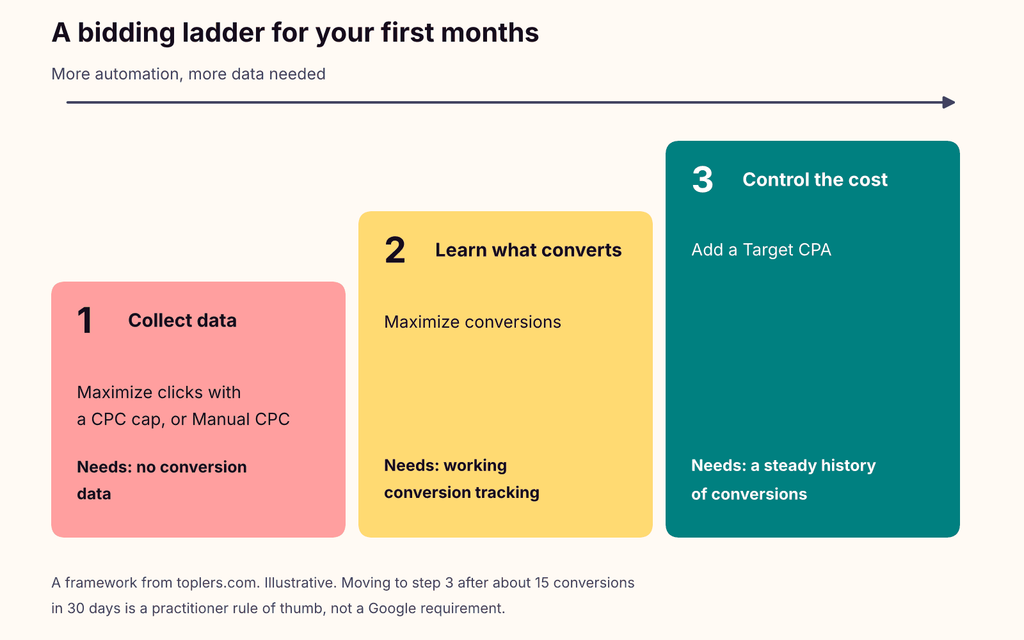
The conversion count before step 3 is a practitioner rule of thumb, not a Google requirement. Your sales cycle and lead volume may need a longer wait.
How much should you spend on Google Ads?
You set an average daily budget for each campaign. Google says spend on a single day can reach up to twice that amount for most campaigns, but you are not charged more than 30.4 times the daily budget in a month. A daily budget of ₹1,000 can cost up to ₹2,000 on a busy day and up to ₹30,400 in a month.
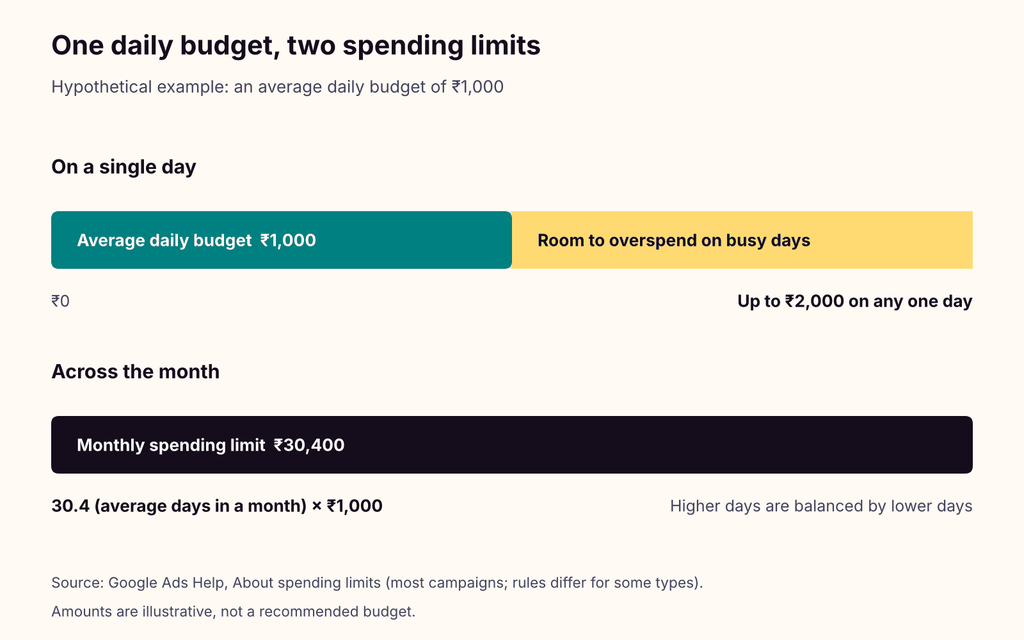
Work backwards from leads, not forwards from what feels comfortable. Cost per lead equals cost per click divided by conversion rate. Monthly budget equals target leads times cost per lead. Daily budget equals monthly budget divided by 30.4.
The example below is a hypothetical scenario to illustrate the process. It is not a real client.
A service business wants 10 leads a month. It assumes a ₹60 cost per click and a 5% landing page conversion rate. Cost per lead is ₹60 divided by 0.05, which is ₹1,200. Ten leads need about ₹12,000 a month, or roughly ₹395 a day. That buys about 200 clicks, enough to test the assumptions. If the real click cost is double, the same ten leads cost about ₹24,000. Replace both assumptions with your own numbers from Keyword Planner and your first two weeks of data.
If you are splitting money across channels, our free marketing budget planner suggests how to divide a monthly budget by goal.
A 15-minute weekly routine that stops wasted spend
- Open the search terms report and add negative keywords for irrelevant searches.
- Submit a test inquiry to confirm conversions are still recording.
- Compare your cost per lead with the number in your budget math.
- Replace the weakest headlines with new angles.
- If the campaign is limited by budget and cost per lead is on target, raise the budget gradually. If not, fix the ads or page before adding money.
When Google Ads is not the right move
- Tracking is not working, so you cannot tell a lead from a click.
- Few people search for what you sell. Check Keyword Planner first, because social or video may fit better.
- Your landing page does not make one clear offer.
- Your budget would buy too few clicks to learn anything.
- You cannot reply to leads within a day, so the clicks you pay for go cold.
In each case, fix the gap first, then spend.
Google Ads for beginners: frequently asked questions
How much should I spend on Google Ads per day?
There is no single right amount. Work backwards from the leads you want and your expected cost per lead, then divide the monthly total by 30.4. Start with an amount you can afford to lose while you learn, and keep it steady for a few weeks.
Is Google Ads better than SEO?
Neither is better in every case. Google Ads brings traffic quickly and stops when you stop paying, while SEO builds slowly and keeps working. Many businesses use ads to learn which keywords convert, then build SEO around them.
What is a good CTR for Google Ads?
A WordStream by LocaliQ study of Google and Microsoft Ads campaigns, from April 2025 to March 2026, found an average CTR of 6.64%. That data is not specific to India, and industry, position and keywords change it, so treat it as context, not a target. Judge your ads by cost per lead.
How long does Google Ads take to work?
Ads can start showing soon after Google approves them, but plan on several weeks of learning. You need enough clicks and conversions to see which keywords, ads and pages work. Judge the first month on what you learned, not on profit.
Which bidding strategy should a beginner use?
Start with Maximize clicks (with a maximum CPC limit) or Manual CPC while you collect data. Move to Maximize conversions once tracking records real leads, then add a Target CPA when your cost per lead has settled.
Can I run Google Ads myself?
Yes, if you can set up tracking, check search terms weekly and spend time learning. Many owners start themselves, then ask for an account review once spend grows. Keep ownership of your ad account either way.
Where to go from here
The core lesson of Google Ads for beginners: setup, bidding and budget only work together when tracking comes first. At Toplers we set up conversion tracking before any ad spend, and clients own their ad accounts, website and data. Our Google Ads and PPC management is built on more than eight years of hands-on experience in search, paid media and automation.
Want a second opinion before you spend? Request a free audit and we will review your website, ads and competitors, with no obligation.
Sources
- Google Ads Help, About Ad Rank. Ad Rank factors and how quality affects cost.
- Google Ads Help, About Quality Score for Search campaigns. Quality Score as a diagnostic, not an auction input.
- Google Ads Help, About spending limits. Daily limit of twice the average daily budget and monthly limit of 30.4 times it, for most campaigns.
- Google Ads Help, About automated bidding. Maximize clicks, Maximize conversions, Target CPA and Smart Bidding.
- Search Engine Journal, What Are Good Google Ads Benchmarks In 2026?. WordStream by LocaliQ benchmarks, Google and Microsoft Ads, April 2025 to March 2026. Average CTR 6.64%.